The goal
Turn on a buzzer, then use tone() to play different pitches.
You'll learn
- ■Active vs. passive buzzers
- ■Using tone() and noTone()
- ■Frequency = pitch
- ■Arrays for storing a melody
1You'll need
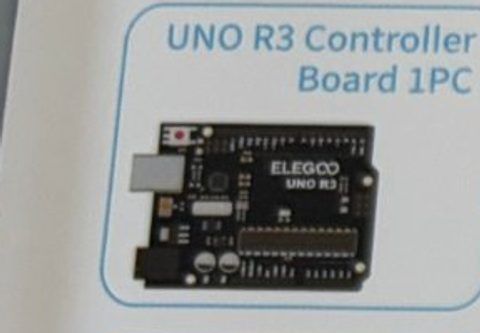



2Wire it up
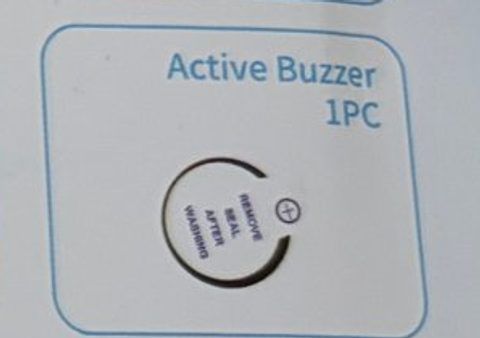
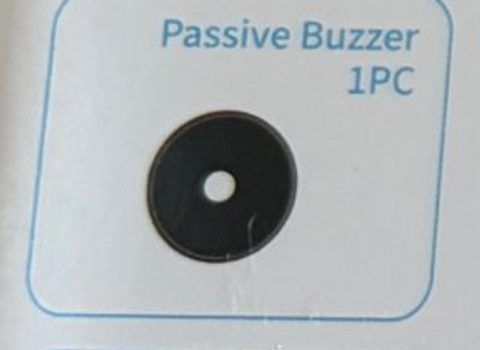
The kit has two buzzers that look almost the same. The ACTIVE one has a sticker on top and makes a tone on its own. The PASSIVE one has an open top and needs the Arduino to make the tone. Start with the active one.
Pins used on the Arduino
- 1Pin 8 · Buzzer + (long leg)
- 2GND · Buzzer − (short leg)
- All GND pins are connected together, so any GND works.
Step by step
- 1Push the buzzer into the breadboard with its legs in two different rows. The leg marked + (usually the longer one) is positive.
- 2Jumper wire from the + leg → Arduino pin 8.
- 3Jumper wire from the other leg → Arduino GND.
- 4For the level-up, swap in the passive buzzer. Same wiring.
Connection checklist
| From | To | |
|---|---|---|
| ☐ | Buzzer + leg | Arduino pin 8 |
| ☐ | Buzzer − leg | Arduino GND |
3The code
Click Copy code, paste it into a new sketch in the Arduino IDE (replacing everything), then click Upload.
// Session 2 - Active buzzer
int buzzerPin = 8;

void setup() {
  pinMode(buzzerPin, OUTPUT);
}

void loop() {
  digitalWrite(buzzerPin, HIGH);  // beep
  delay(200);
  digitalWrite(buzzerPin, LOW);   // quiet
  delay(200);
  digitalWrite(buzzerPin, HIGH);  // beep
  delay(200);
  digitalWrite(buzzerPin, LOW);
  delay(1000);                    // long pause
}Swap in the PASSIVE buzzer for this one. tone() picks the pitch in hertz (vibrations per second).
// Session 2 - Passive buzzer siren
int buzzerPin = 8;

void setup() {
  // tone() sets up the pin for us, nothing to do here
}

void loop() {
  // slide the pitch up...
  for (int freq = 400; freq < 1200; freq += 10) {
    tone(buzzerPin, freq);
    delay(5);
  }
  // ...and back down
  for (int freq = 1200; freq > 400; freq -= 10) {
    tone(buzzerPin, freq);
    delay(5);
  }
}Each number in melody[] is a note's frequency. beats[] says how long to hold it.
int buzzerPin = 8;

// Twinkle Twinkle: C C G G A A G
int melody[] = {262, 262, 392, 392, 440, 440, 392};
int beats[]  = {1,   1,   1,   1,   1,   1,   2};
int noteCount = 7;

void setup() {}

void loop() {
  for (int i = 0; i < noteCount; i++) {
    tone(buzzerPin, melody[i]);
    delay(300 * beats[i]);
    noTone(buzzerPin);       // tiny gap between notes
    delay(50);
  }
  delay(2000);               // wait, then play again
}4How it works
Active = has its own brain
The active buzzer has a tiny circuit inside that makes a tone whenever it gets power. You can only turn it on or off, which is perfect for alarms.
Passive = just a speaker
The passive buzzer is only a vibrating disc. The Arduino has to tell it how fast to vibrate using tone(pin, frequency). Faster vibration = higher pitch. 262 Hz is middle C.
Arrays
melody[] is a list of numbers in a row. melody[0] is the first, melody[1] the second, and so on. The for loop walks through the list one note at a time.
5Try this
- AMake the active buzzer beep faster and faster like a bomb timer in a movie.
- BLook up note frequencies and program the first line of a song you know.
- CMake the siren go up fast and down slow.
- DAdd the button from Session 1: the tune plays only when you press it (a doorbell!).
6Stuck?
No sound at all.+
Check the + leg is on pin 8 and the other on GND. Make sure you're using the active buzzer for the first sketch.
The siren sketch only makes a click or a steady tone.+
You have the active buzzer plugged in. Swap in the passive one (open top, no sticker).
Sound is very quiet.+
That's normal for these small buzzers. Try pushing it firmly into the breadboard.